English




Product Quality Assurance and Disclaimer
Since its establishment, our company has maintained a rigorous and responsible attitude to provide each customer with comprehensive services from consultation to after-sales. To facilitate your understanding of our company and uphold our responsible attitude towards product quality, we hereby publicize the print quality assurance and disclaimer as follows:
After-sales Time Limit
Please check the goods in a timely manner for quality issues upon receipt, and submit an after-sales application for handling within one month. After-sales requests submitted beyond 1 month will not be accepted. Thank you for your understanding!
Color Difference Issue
- Printing adopts CMYK four-color offset printing. Do not use RGB mode or spot colors for color filling. Do not require the printing color to match the color displayed on the screen or printed draft. When designing, you must make color filling according to the color spectrum. Otherwise, after-sales service will not be provided for the resulting color difference.
- We will strictly print according to the CMYK color value standard in the file. However, for the same type of printed matter with different order numbers and different batches, due to differences in temperature, humidity and manual operation, a color difference of about 10% is normal. Especially dark blue, dark green, dark purple, bordeaux red, brown, coffee and gray are classified as high-risk colors. A color difference of about 5% will be visually obvious, especially for some large-area solid background and flat screen prints. During printing, ink bars, uneven printing and multiple colors in one batch are likely to occur. This phenomenon is unavoidable, and after-sales service will not be provided within this range.
Cutting Issue
There is a cutting error of 2mm. The distance between the effective content design and the finished product edge must be at least 2mm or more (excluding bleed). Especially for files with color bar borders around, uneven cutting may occur, which is visually obvious. Please inform the customer in advance. After-sales service will not be provided within this range.
Four-color Black Text and QR Code Issue
Please design black text and QR codes as single black (K100, CMY=0), and large-area black color values as (K100, C30, M0, Y0). Do not design four-color black, as four-color black will cause sticking and misregistering. After-sales service will not be provided for non-compliant operations.
File Name and Remarks Issue
Order production shall be based on the selected printing requirements. File names and remark information shall not be used as reference for production. Be sure to select the corresponding paper and process when placing an order, otherwise after-sales service will not be provided for the resulting losses.
Minor Scratch Issue
PVC cards require a lamination process to achieve glossy, frosted and matte effects. There are many post-production processes and friction during transportation, which are prone to minor scratches. Glossy materials do not cover defects, so minor scratches on glossy cards are unavoidable and after-sales service will not be provided. For customers with high requirements, we recommend using frosted or matte materials.
Missing Codes and Number Gaps Issue
PVC card production involves many processes. There is a 0.5% loss rate in numbering, and machine numbering may occasionally skip numbers. Therefore, we cannot guarantee that the numbers are completely consecutive. After-sales service will not be provided for missing code issues.
Material Difference Issue
PVC is a plastic product. The thickness of materials from different batches may have an error of about 2 silk, and the color may have slight differences, which are normal phenomena. Please inform the customer in advance. For glossy, frosted materials or thickness greater than 0.38MM, the cards need to be laminated to form finished products. Affected by temperature, humidity, fabric, middle material thickness error and other factors, the cards may be slightly uneven. This situation is unavoidable and after-sales service will not be provided. Due to the special material properties, we cannot guarantee that the finished products can be reprinted with additional content, and after-sales service will not be provided for such issues.
Usage and Consumption
Due to the probability of missing numbers or defective products in cards, if the printed content includes amounts, or the cards are paid tickets, vouchers, valuable coupons, etc., please verify the accuracy of the cards before use. We shall not be liable for any consequential losses.

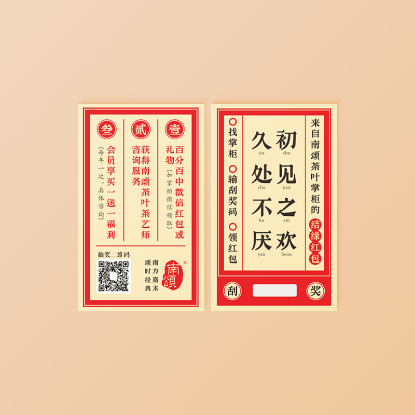
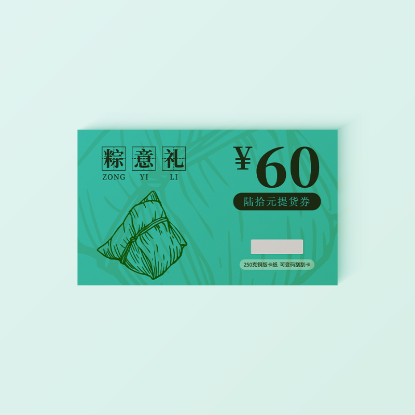
PVC Scratch Card
Product Effect
PRODUCT


Product Material
PRODUCT MATERIAL

Glossy New Material
Smooth surface, bright and rich colors, affordable price, wide range of uses.
[Thickness] 0.38mm, 0.76mm
Matte New Material
Smooth and delicate, non-reflective, scratch-resistant.
[Thickness] 0.38mm, 0.76mm
Product Process
PRODUCT PROCESS


Precautions
PRECAUTIONS
- The design size must be 88.5*57MM, and the effective content must be at least 4mm away from the edge;
- Account numbers and passwords can only be inkjet printed. Both sets of data can be customized. You must upload the account and password data table when placing an order;
- When making the data table, the card number and password shall each occupy one column. The number of digits for each entry must be consistent, and the number of rows must be equal to the required quantity of products. Supported data upload formats: xls\xlsx\txt;
- If the account number and password need to correspond to each other, they must be designed on the same horizontal line on the same side. There is no need to design a separate white frame for the password silver scratch area, except for black and dark gray backgrounds;
- A maximum of 2 silver scratch areas can be made. The design position of the second silver scratch area shall be arranged downward based on the first one. If the data in the silver scratch area needs to contain letters, they must be uppercase;
- Due to the many post-production processes of scratch cards, there will be product loss. After-sales service will not be provided for losses within 2%. Please inform the customer in advance.
PVC Category - PVC Scratch Card Order Guidelines
Dear Customer:
PVC scratch card files are processed automatically by the system. For the efficiency of both parties, please abide by the following rules!
I. Design Requirements for Silver Scratch Area
- Both account numbers and passwords are black. There is no need to design a separate white frame for the silver scratch area, except for black and dark gray backgrounds;
- If a white frame must be used, its size must be 3MM smaller in both length and width than the silver scratch specification;
Please refer to the following figure for the design of the silver scratch area:
- If the account number and password need to correspond to each other, they must be designed on the same horizontal line on the same side;
Example Figure:

- 04. A maximum of 2 silver scratch areas can be made. The design position of the second silver scratch area shall be arranged downward based on the first one.
Example Figure:

II. Data Design Requirements
- Card numbers and passwords shall each occupy one column. The number of digits for each column must be consistent, and the number of rows must be equal to the required quantity of products. Letters must be uppercase. Supported data upload formats: xls\xlsx\txt;
- For multiple types of card numbers and passwords, each shall occupy one column. The number of digits for each column must be consistent, and the number of rows must be equal to the required quantity of products. Letters must be uppercase. Supported data upload formats: xls\xlsx\txt;
Example Figure:
Card Number Password Precautions 000001 XZ000241 The number of digits in the card number column must be consistent 000002 XZ000252 The number of digits in the password column must be consistent 000003 XZ000263 The number of card numbers and passwords must match the product quantity …… …… 000500 XZ000580 Letters must be uppercase - Due to the many post-production processes of scratch cards, there will be product loss. After-sales service will not be provided for losses within 2%. Please inform the customer in advance.
III. Design Tips
- Black and Gray
- a. Black Text:
- AI/PDF/CDR Files: Black text color value C0 M0 Y0 K100,
- JPG Files: Black text color value C0 M0 Y0 K100, no stroke color mode set to multiply. If there is a stroke, set the color mode to normal.
- b. Large-area Black Background: C0 M0 Y0 K100. For a deeper black, the recommended color value is C30 M0 Y0 K100;
- c. Design gray text and gray backgrounds as single-color gray: C0 M0 Y0 K (8-90).
- a. Black Text:
- QR Code
QR codes are printed directly according to your design file without post-processing. QR codes are recommended to be designed as single black with a size ≥14mm. If your QR code is too small or designed as four-color, it may not be scannable.
To convert a four-color QR code to single black in PSD software, follow these steps:
Open the QR code in PSD → Edit → Convert to Profile → Target Space, select "Custom CMYK" for the profile, keep other settings unchanged and click OK → In the pop-up window, click OK → For Custom CMYK, select "Maximum" for Black Generation, enter "400" for Total Ink Limit, click OK → Check the QR code in the Info panel to see if it is single black. (See the figure below for specific settings as reference. You can create an action for convenient operation next time)


03. High-risk Colors and Design Color Notes
with C Color
High C Value
Four-color Black
- The above figure lists some high-risk colors. Printing these colors may cause ink bars and obvious color differences, which are unavoidable printing phenomena. To ensure normal delivery, please inform the customer in advance. It is recommended that the total CMYK four-color value ≤ 250.
- On PVC materials, the individual color value of each of C, M, K should be above 8, and Y should be above 5. If the color is too light, it may not be printed clearly.
- Please design colors in CMYK four-color mode. Do not use spot colors or RGB colors. If the file color is not in CMYK mode, we will convert it directly, which may cause color changes.
- Recommended color values for some common colors:
- Yellow Series: C=0. To deepen the color, you can add K value. If the yellow series in your file contains C (cyan), the printed color will be greenish or dull. Example: C0 M30 Y90 K10
- Blue: It is recommended that M value < 80. Example: C100 M70 Y0 K0
- Purple: It is recommended that C value < 75. Example: C70 M100 Y0 K0
- Dark Red: C=0, K ≤ 60. Example: C0 M100 Y100 K30
- Dark Green: M=0, K ≤ 60. Example: C100 M0 Y100 K40
- Dark Blue: Y=0, K ≤ 50. Example: C100 M75 Y0 K40
- Dark Purple: Y=0, K ≤ 50. Example: C60 M100 Y0 K40
- Coffee: Do not use all four CMYK colors. Example: C0 M80 Y100 K60
04. To ensure printing effect, it is recommended to submit vector files (CDR/AI) or JPG files (with resolution above 500 dpi).